Database Structure
Author: Georgi Peev
The WFP Chatbot utilizes MongoDB as its primary database system. The database architecture is designed to support efficient data retrieval, conversation context management, and usage monitoring.
Schema Diagram
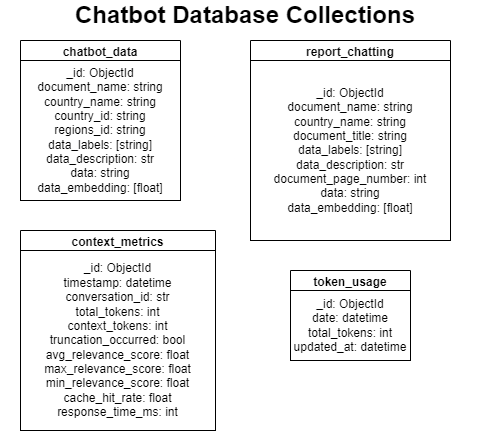
Collections Overview
1. chatbot_data
Primary collection for storing general chatbot data:
{
    "_id": "ObjectId",
    "document_name": "string",        // Unique identifier for the document
    "country_name": "string",         // Country the data belongs to
    "country_id": "string",           // Country ID code
    "regions_id": "string",           // Region ID code
    "data_labels": ["string"],        // Categories/tags for the data
    "data_description": "string",     // Description of the content
    "data": "string",                // Actual content text
    "data_embedding": [float]        // Vector embedding for similarity search
}
2. report_chatting
Collection for storing country-specific report data:
{
    "_id": "ObjectId",
    "document_name": "string",        // Unique identifier for the document
    "country_name": "string",         // Country the report belongs to
    "document_title": "string",       // Title of the report
    "data_labels": ["string"],        // Categories/tags for the data
    "data_description": "string",     // Description of the content
    "document_page_number": "int", // Page number in source document
    "data": "string",                // Actual report content
    "data_embedding": [float]        // Vector embedding for similarity search
}
3. context_metrics
Collection for monitoring conversation context performance:
{
    "_id": "ObjectId",
    "timestamp": "datetime",         // When metrics were recorded
    "conversation_id": "string",     // Unique conversation identifier
    "total_tokens": "number",        // Total tokens in conversation
    "context_tokens": "number",      // Tokens used for context
    "truncation_occurred": "boolean",// Whether context was truncated
    "avg_relevance_score": "number", // Average relevance of retrieved docs
    "max_relevance_score": "number", // Maximum relevance score
    "min_relevance_score": "number", // Minimum relevance score
    "cache_hit_rate": "number",      // Rate of cache hits
    "response_time_ms": "number"     // Response time in milliseconds
}
4. token_usage
Collection for tracking daily token usage:
{
    "_id": "ObjectId",
    "date": "datetime",             // Date of usage (midnight timestamp)
    "total_tokens": "number",       // Total tokens used that day
    "updated_at": "datetime"        // Last update timestamp
}
Key Features
1. Vector Search
- Both
chatbot_dataandreport_chattinginclude vector embeddings - Enables semantic similarity search for relevant context
- Optimized for fast retrieval of related content
2. Performance Monitoring
- Comprehensive metrics tracking in
context_metrics - Token usage monitoring in
token_usage - Response time measurements
- Cache hit rate tracking
3. Data Organization
- Separation of general chatbot data and report-specific data
- Structured document metadata
- Vector embeddings for search optimization
Configuration
The database connection is configured through environment variables:
MONGODB_URI=mongodb://connection_string
MONGODB_DB=database_name
MONGODB_COLLECTION=collection_name
DAILY_TOKEN_LIMIT=26000
Data Management
1. Data Ingestion
- Automated parsing of PDF reports into
report_chatting - Vector embedding generation for both collections
- Structured data organization
2. Monitoring & Cleanup
- Daily token usage tracking
- Context metrics collection
- Automated cleanup of old metrics (configurable retention)
3. Performance Optimization
- Vector indexing for similarity search
- Structured metadata for efficient querying
- Separate collections to optimize access patterns